Expert advice for payment reviews
Veriscope helps bank staff investigate suspicious company payments. I designed internal consultations: ask a specialist, share relevant material and keep the answer in the case, so another colleague can return to it later.
01
Problem
An analyst reviews a suspicious payment and its documents. Sometimes they need a colleague who knows the industry better. They discuss the question in a work chat or by email, then save the result in the case.
The difficulty comes later: new documents arrive or someone else takes over. A copied answer is no longer enough. The next analyst needs to know which material supported it and what still needs checking.
The product is designed for a UK commercial bank. My wider work covered the analyst workspace; this case focuses on consultations, from the first question to returning to an answer.
02
Research
Business task
Reduce repeated review
When a case changed hands, staff had to reconstruct what a colleague's answer was based on. The initial proposal was to make experts easier to find. I examined the whole journey, from asking a question to returning to the answer.
In interviews, I reconstructed recent analyst requests: how the question arose, who helped, what material was shared and how the answer was used later. I mapped the journey from those requests.
I compared a knowledge base, a staff directory, messaging and a case note. A good note already worked for a one-off question. I focused the design on consultations with follow-ups, new documents and case handovers.
- Participants
- 19
- 8 analysts, 8 experts and 3 people responsible for the process and access.
- Interviews
- 11
- Discovery: 4 analysts, 4 experts and the 3 process and access owners.
- Requests reviewed
- 8
- Two recent requests from each of four analysts.
- Review rounds
- 2 × 8
- Each had 4 analysts and 4 experts: 4 new and 4 returning participants.
There were 19 people in total, with some taking part at several stages. After the two rounds, I ran a separate comparison with 8 analysts from this group. Interviews and review sessions do not add up to new participants.
- Interviews
- Review of requests
- Journey mapping
- Comparison of alternatives
- Scenarios in Figma
For a UK bank, I reviewed financial rules and guidance on money laundering prevention and data protection. I used them to inform the boundaries of consultations and material sharing.
FCA and JMLSG
The FCA is the financial regulator; JMLSG publishes anti-money-laundering guidance. I reflected their emphasis on context and competence in the answer's author, documents and limits.
ICO
The data protection regulator calls for sufficient, relevant information without unnecessary data. I used excerpt selection and a preview to make sharing a deliberate choice.
Stack Internal and Hummingbird
In Stack Internal, I reviewed expertise-based discovery and retained authorship. In Hummingbird Requests, I reviewed requests, recipients and status within a case. I used these patterns in the consultation journey.
03
Insights
Finding someone is not an agreement to help
Knowing the subject does not mean having time. I separated expert selection from acceptance, so it is clear who has taken the question and when to expect an answer.
BasisOwnership was unclear in two requests; 3 of 4 experts linked participation to allocated time.
A short question still needs context
An explanation needs relevant material. I added excerpt selection and a preview, so the analyst can check what their colleague will receive before sending it.
Basis2 of 5 questions needing expert advice required additional material.
The answer must make sense to the next person
A handover needs more than the conclusion. I kept the author, supporting document versions and remaining questions alongside the answer.
Basis3 of those 5 questions lost the link between the answer and its documents. One already worked with a good note.
04
User needs and hypotheses
I defined the needs of both roles and separated expected value from assumptions about the interface.
Business hypotheses
Returning with the context intact
If the answer stays in the case with its supporting document versions, an analyst will resume the review faster than with a good note, while understanding it just as accurately.
- Basis
- Handovers lost the link between the answer and its documents. In one case, a good note already met this need.
- How I tested it
- Using comparable examples, I compared the consultation with a good note, recording time to reconstruct context, accurate explanations and prompts. The criterion was less time at the same accuracy.
Initial support
In the prototype task, median time to reconstruct context fell from 12 to 9 minutes. All 8 analysts reached a correct result in both conditions, including help when needed.
Design decision
The shorter time at the same accuracy led me to keep the answer, document versions and next step together within the case.
Participation without overload
If experts have allocated time and can accept or decline a request, consultations will be able to meet an agreed response time.
- Basis
- 3 of 4 experts linked their help to allocated time.
- How I tested it
- Over 10 working days, I checked whether experts could answer requests on one topic by the first agreed deadline within an hour a day. The exercise involved 6 analysts and 3 experts from the existing group.
Partial support
Of 30 requests, experts accepted 24 and declined 6. They answered 21 of the 24 accepted requests on time. Two experts each exceeded their allocated hour once.
Design decision
Because experts could not always take a request or meet its deadline, I kept explicit acceptance, refusal and the option to suggest another time.
Interface hypotheses
A clear sharing boundary
If the analyst sees the question and excerpts as the recipient will see them, they will understand which information they are sharing.
- Basis
- In the first round, 2 of 4 analysts thought the expert would receive access to the whole case.
- How I tested it
- In both rounds, I asked analysts to explain what their colleague would receive. A correct response named the recipient and shared material without a prompt.
Initial support
In round two, 4 of 4 analysts did this. The finding is limited to this small group.
Design decision
After round one, I refined the preview to show the recipient and selected excerpts so the analyst could check exactly what would be shared before sending.
A clear meaning for the answer
If the answer shows its documents and limits, with separate consultation and case statuses, the analyst will distinguish an explanation from the final case decision.
- Basis
- In the first round, 2 of 4 analysts treated the answer as a payment decision.
- How I tested it
- I asked participants to explain what the answer established and what came next. A correct response distinguished the explanation from the case decision.
Initial support
In round two, all 4 participants in each role explained these limits correctly. The finding is limited to this task and small group.
Design decision
After round one, I clarified the answer's limits and made the separate consultation and case statuses explicit, so resolving the question would not imply payment approval.
05
User journey
The map follows the analyst from a difficult question to continuing the review. Difficulties in the previous workflow are separate from the interface changes I proposed.
- Role
- A bank analyst reviewing a company payment.
- Situation and goal
- Understand unfamiliar terms, clarify the material when needed and keep the explanation for later work.
-
Frame the question
- Goal
- Understand a difficult term or condition.
- Actions and touchpoints
- Frames the question and explains the context.Case / work chat
- Difficulty
- The question becomes detached from the case material.
- Need
- Discuss the situation alongside its documents.
- My design response
- The consultation starts within the case.
- Where it is shown
-
Choose a colleague
- Goal
- Find the right expertise.
- Actions and touchpoints
- Searches through contacts or a directory.Directory / messages
- Difficulty
- A job title does not reveal the knowledge needed.
- Need
- Know whether the colleague fits the subject.
- My design response
- Expertise, profile and availability are visible.
- Where it is shown
-
Share the request
- Goal
- Share context and agree on help.
- Actions and touchpoints
- Sends material and waits for acceptance and timing.Documents / email or chat
- Difficulty
- A sent message does not mean an accepted request.
- Need
- Check the sharing and know who has taken the question.
- My design response
- Documents can be uploaded within the request; the preview shows the selected excerpts and recipient. The expert separately confirms participation and a reply time.
- Where it is shown
-
Add information
When needed- Goal
- Respond to the expert's clarification.
- Actions and touchpoints
- Finds missing material and shares an update.Clarification / documents / messages
- Difficulty
- New information gets mixed with earlier material.
- Need
- Know what was added and what stayed unchanged.
- My design response
- Missing files can be uploaded here. Updates are shared separately, preserving earlier versions.
- Where it is shown
-
Understand the answer
- Goal
- Identify the next step.
- Actions and touchpoints
- Reads the explanation and checks its documents.Colleague's answer / documents
- Difficulty
- Supporting material has to be found separately.
- Need
- Know what is established and what still needs checking.
- My design response
- Explanation, documents, limits and next step stay together.
- Where it is shown
-
Continue the review
- Goal
- Return to the case or hand it over.
- Actions and touchpoints
- Keeps the result for later work.Case note / message history
- Difficulty
- The explanation has to be reconstructed later.
- Need
- Retain a clear answer and its documents.
- My design response
- The answer stays in the case, with separate consultation and case statuses.
- Where it is shown
Not every request needs clarification. Actions and difficulties describe the previous workflow; design responses and linked screens describe the proposed journey.
06
Interface decisions
I built consultations into the existing case workflow. The analyst can keep the discussion and its result in the place where they are already working.
Expert selection
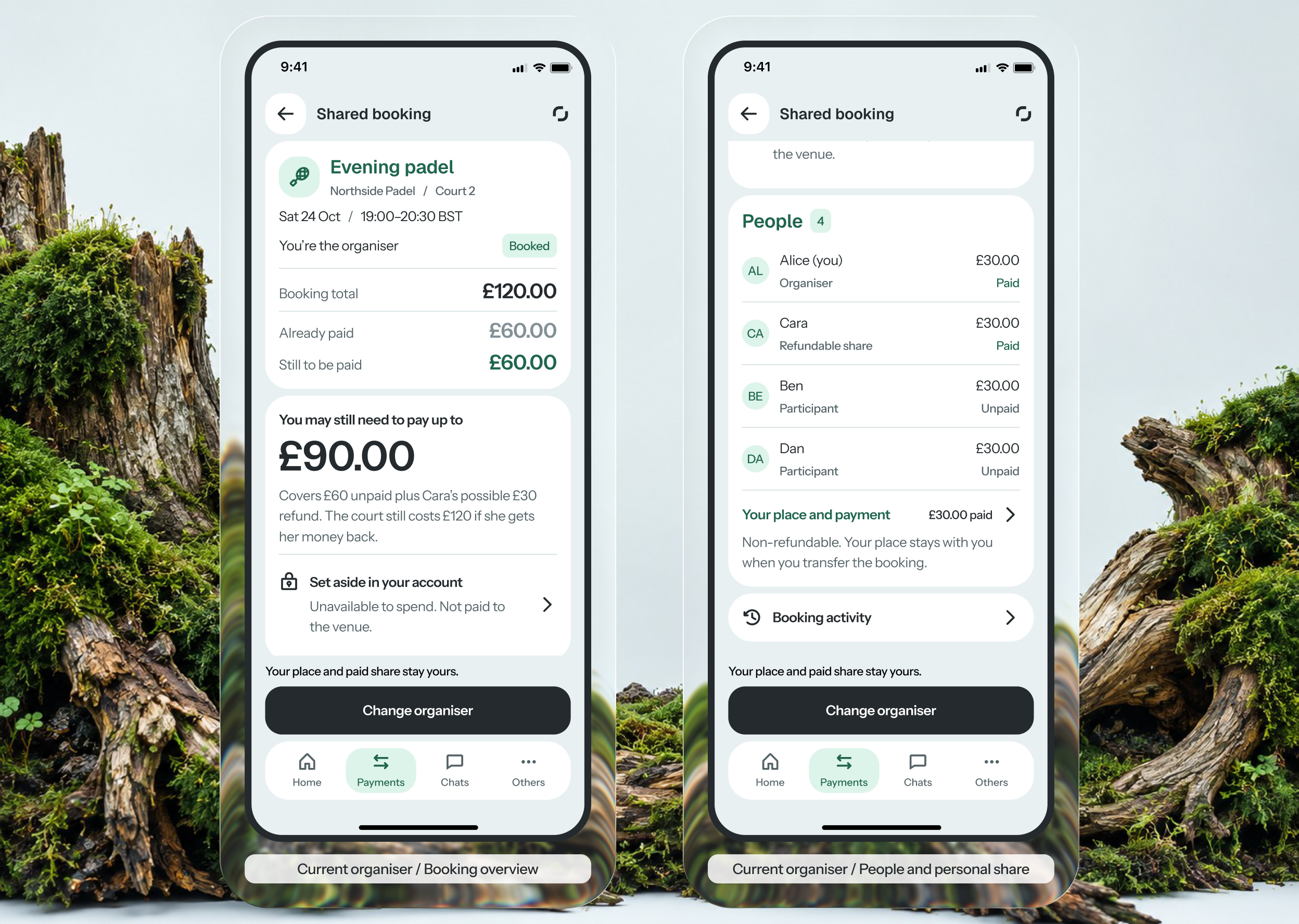
The consultation starts alongside the case material. The analyst writes a question, chooses a colleague by subject and sees their availability. The expert accepts the request separately and agrees a time to reply. Choosing someone does not imply an immediate answer.
What the expert will receive
Analysts can select a case document or upload one within the request. The file is saved to the case; only selected excerpts are shared after preview and sending. If the expert requests more material, the analyst shares an update separately, preserving earlier versions.
Expert answer
The answer brings together the explanation, documents and limits: what has been established and what still needs checking. It opens from the case. The analyst decides when their question is resolved. Only the consultation ends; the bank's case decision remains separate.
Screens by stage
Choose a screen or scroll the row. Open any design to inspect the full screen.
07
Design validation
Across two rounds, I checked whether participants understood the consequences of an action: what the expert receives, who has taken the question and what changes after the answer. I gave scenario tasks and asked them to explain the outcome. Answers following a prompt were recorded separately.
Shared material
- Difficulty
- Selecting documents could suggest access to the whole case.
- What I changed
- I showed the recipient and an exact preview.
New information
- Difficulty
- An update could look like a replacement for earlier documents.
- What I changed
- I separated sharing an update from document versions.
08
Results
I linked the question, follow-ups and answer to one case, including declined requests and unavailable material.
I walked colleagues through the full analyst and expert journeys. After the first discussion, I clarified statuses and material sharing; the second review agreed the main scenario for the next evaluation. Understanding versions and the next step without access remained open for further testing.
After the two rounds, I separately compared the prototype consultation with messaging and a good case note. Over 10 working days, eight analysts from the existing group completed both tasks using each method. Four started with the usual method and four with the prototype. The examples differed, with comparable information and task conditions.
- Preparing a request
- Messages and case note8:20Prototype consultation6:40min:sec −20% time
- From starting preparation until the question is written, a suitable expert is selected and the necessary permitted excerpts are ready to send. Waiting for the expert's reply is excluded.
- Reconstructing case context
- Messages and case note12:00Prototype consultation9:00min:sec −25% time
- From opening an unfamiliar case until the analyst correctly explains the answer and its limits, finds the document versions and names the next step.
- Reconstructed context without a prompt
- Messages and case note5 of 8Prototype consultation7 of 82 more analysts
- Analysts who reconstructed an unfamiliar case's context without a substantive prompt.
For each task and method, I used the median of eight timings. Percentages are the difference between medians divided by the usual method's median. Time with prompts is included; all 8 analysts eventually completed the tasks correctly. Complex versions and unavailable material need a separate check. Time spent investigating real bank cases still needs measurement. File upload was outside this comparison.